

Looking to do more with HubSpot?
Speak with our team to discuss how we can help you get the best out of the platform.
HubSpot's customer agent is a native AI tool built into the HubSpot platform. It handles real conversations with your customers and prospects across live chat, email, WhatsApp, and Facebook Messenger, using the content and knowledge you already have in HubSpot.
It's part of HubSpot's Breeze suite of AI features, and it's designed to support your business at every stage of the customer journey. Whether that's qualifying a lead who just landed on your website, answering a prospect's question at 10pm, or resolving a support ticket without your team needing to lift a finger.
In this blog, we'll cover what the customer agent is, how it works, what you can use it for, and how to get it set up.
The customer agent is an AI-powered tool that sits natively inside HubSpot CRM. Unlike a traditional chatbot, which routes users through a fixed set of paths and tends to fall apart the moment someone asks something unexpected, it can draw on your actual business content to have genuine, contextual conversations.
You connect it to knowledge sources: your website pages, blogs, landing pages, knowledge base articles, uploaded documents, or any combination of these. It then uses that information to answer questions accurately, citing the sources it's pulling from as it goes. So if someone asks about your HubSpot accreditations, it'll find the relevant page on your website, pull the answer from it, and link out to the source. It's not guessing. It's not filling gaps with generic responses. It's working from what you've actually published.
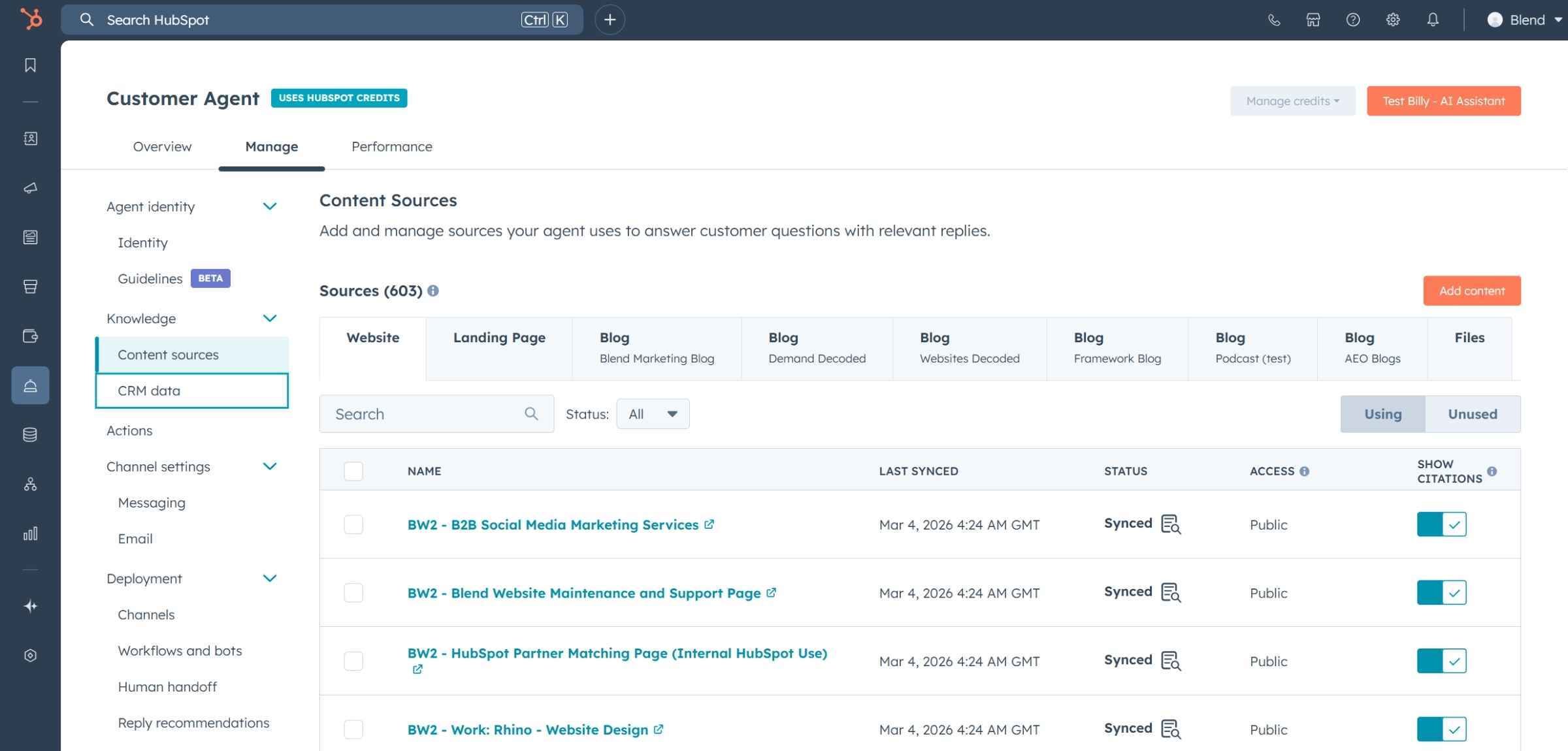
The more quality content you have, the better it performs. And because it's built into HubSpot CRM, it has direct access to the data already living in your portal, which means it can personalise its responses based on what it knows about a contact rather than treating every conversation as if it's starting from scratch.
It's also worth noting that this isn't a bolt-on integration or a third-party tool you have to stitch together with your CRM. It's built natively into HubSpot, which means setup is straightforward, conversations are logged automatically, and everything stays in one place.
When you set up the customer agent, you're essentially building a large language model trained on your business. It ingests your content, learns from it, and uses it to respond to incoming conversations wherever those conversations happen.
By default, the agent can pull from all of your HubSpot website pages, landing pages, and blog posts. You can also upload files directly, such as product documentation, FAQs, or proposal templates, or add public URLs to include external content. If you have a HubSpot knowledge base set up in Service Hub, you can connect that too.
It's worth being deliberate about what you include. The customer agent isn't guessing or making things up. It's working from real content, so the quality of its answers will reflect the quality and completeness of what you feed it. A well-maintained knowledge base with clear, accurate articles will produce noticeably better responses than a handful of outdated web pages.
Over time, the agent also flags knowledge gaps, areas where it's being asked questions it can't confidently answer. That's genuinely useful. It tells you where your content has holes and gives you a clear prompt to fill them.
One of the most useful things about the customer agent is that it's not tied to a single channel. You can deploy it across:
All of these connect through HubSpot's inbox system, so every conversation is logged in your CRM and easy to manage in one place. You're not jumping between tools or losing context when a conversation moves from chat to email. It all lives in HubSpot.
You can configure how the agent sounds. Choose from pre-set personality options like empathetic, friendly, or professional, or apply your brand voice from your HubSpot settings. You can also add specific guidelines to shape how it responds, which is useful if your industry requires particular phrasing, scripted answers to common questions, or a specific tone that the pre-set options don't quite capture.
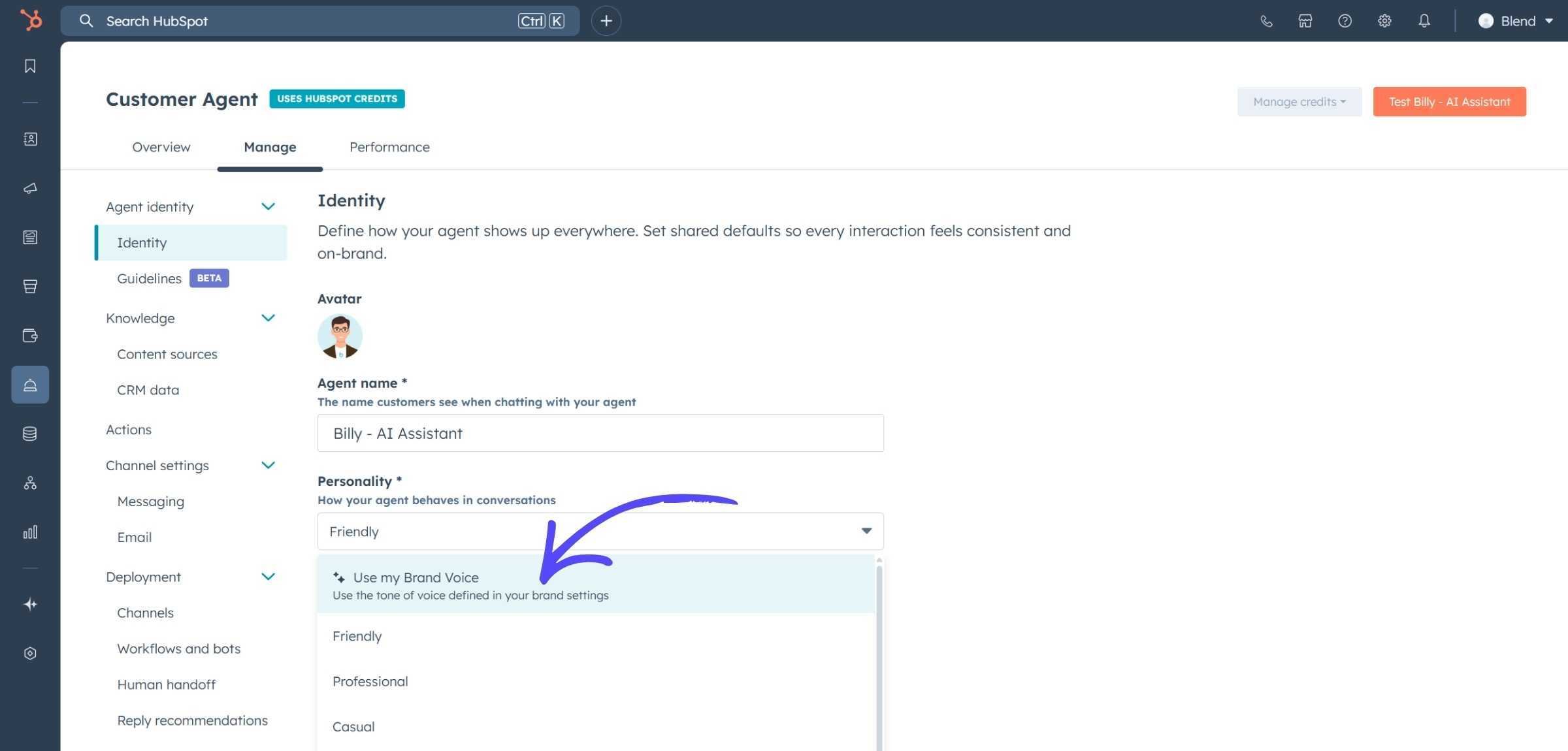
If you've already set up brand voice in HubSpot, the customer agent will pick that up automatically. It's a small thing, but it means the agent feels like part of your business rather than a generic AI tool someone dropped onto your website.
Because the customer agent sits inside HubSpot CRM, you can use existing contact data to personalise responses. If a customer reaches out about an order, for example, the agent can look up their record and respond with relevant information without asking them to repeat themselves. For businesses with high volumes of repetitive queries, this is where the time savings start to add up quickly.
You can also set up automated actions based on signals the agent picks up during a conversation. If someone mentions a specific product issue, for example, the agent can trigger a follow-up workflow, create a ticket, or escalate to the right team member, without any manual input required.
The customer agent works across marketing, sales, and service. Here's how it can help at each stage.
When someone lands on your website for the first time, the customer agent can step in immediately. It can answer questions about your services, understand what a visitor is looking for, and start qualifying them, all before they've spoken to a single person on your team.
This is particularly valuable outside of business hours. Buyers don't always do their research between nine and five. If someone is on your website at 8pm comparing their options and your agent can answer their questions clearly and point them towards relevant content, you're more likely to stay in contention than a competitor whose website just has a contact form.
Over time, the agent also learns which questions come up most frequently and surfaces suggested conversation starters based on real interactions. Those prompts appear on the chat widget itself, so visitors can get to the information they need faster. That means it gets more useful the longer you use it.
Buyers who are further along in their decision-making often have specific questions: accreditations, case studies, pricing, implementation timelines. The customer agent can answer these using your actual content, complete with cited sources, so prospects get the information they need straight away rather than waiting for someone to get back to them.
That speed matters. Research consistently shows that the faster you respond to an inbound enquiry, the more likely you are to convert it. The customer agent doesn't replace your sales team, but it does make sure that no one is left waiting for basic information that's already sitting on your website.
If your team is handling a high volume of repetitive support questions, the customer agent can take those on automatically. It works across email, chat, and WhatsApp, drawing from your knowledge base and product documentation to give accurate, consistent answers.
Think about the questions your support team answers every single day. The customer agent can handle all of those, at any time, without anyone on your team needing to be involved. That frees up your support staff to focus on the queries that genuinely need their expertise.
You can also build more structured response paths using workflows and branch logic within the agent for scenarios that are more complex. And when a query falls outside what it can handle, it knows to hand off to a human, with the full context of the conversation already captured so the handoff is seamless.
In HubSpot, the customer agent sits under the Service section. The setup process is more straightforward than you might expect, and if you already have content in HubSpot, you're most of the way there before you've even started. Here's a simple overview of how to get going.
Give your agent a name and define its tone. You can choose a pre-set personality or apply your existing brand voice. This is also where you'd add any specific guidelines for how it should respond. If there are questions it gets asked regularly, including suggested responses in the guidelines can help it maintain consistency.
Connect the content you want the agent to draw from. Your HubSpot pages are available by default. From there, you can upload additional files or add URLs to pull in anything else that's relevant. Think about what your customers and prospects actually ask, and make sure the answers are covered somewhere in your knowledge sources. The more comprehensive your content, the more confident the agent's responses will be.
If you want the agent to personalise responses using contact data, configure this here. You can also set up automated actions for repetitive queries, things like order status updates or ticket creation that don't need any human involvement. For product-based businesses or anyone with a high support volume, this step is worth spending time on.
In HubSpot's inbox settings, you'll connect the customer agent to whichever channels you want it to operate in. For your website, you'll create a chat flow in the usual way, but assign it to the customer agent inbox rather than a person or team. You can also connect email inboxes, WhatsApp, and Facebook Messenger from the same place.
Finally, decide how the agent handles conversations it can't resolve. Set rules for when to hand off to a human, how to manage inactivity, and how to handle reply behaviour on email. Getting this right matters. The handoff experience is part of the overall impression your business makes, and a clunky transition from bot to human can undo a lot of the goodwill the agent has built up.
The customer agent is available with most seat-based HubSpot packages, which makes it accessible without needing to be on an enterprise-level plan. It runs on Breeze credits, so each conversation consumes a small number of credits and the cost scales with how active your agent is.
In practice, the cost is minimal relative to the time it saves. If your team is currently spending hours each week answering the same support questions or manually qualifying inbound leads, the customer agent will pay for itself fairly quickly. It's also worth noting that the setup time is low, so you're not investing heavily upfront to get it running.
It's worth checking your current HubSpot plan to confirm exactly what's included, or speaking to your HubSpot partner if you're unsure. Breeze credits are shared across HubSpot's AI features, so if you're already using other Breeze tools, it's good to understand how your usage stacks up.
The customer agent is one of those tools where the barrier to getting started is genuinely low. If you already have a solid library of content in HubSpot, you're most of the way there. Set it up, connect it to your channels, and it'll start working for you straight away.
The key to getting the most out of it is treating it like a team member rather than a piece of software. Give it good content to work from, keep that content up to date, and pay attention to the knowledge gaps it flags. Do that, and it'll get better over time.
Whether you want to qualify leads more efficiently, speed up support resolution, or simply make sure people get useful answers whenever they come looking, it's a practical and well-integrated addition to your HubSpot setup.
Speak with our team to discuss how we can help you get the best out of the platform.