

Considering HubSpot CMS for your website?
Speak with our team to discuss how we can create a website that gives your marketing team the control they need.
Editing your website should be straightforward. When you need to update a service page, launch a new landing page, or test different messaging, you want to move quickly without depending on developers or risking design inconsistencies.
HubSpot's website builder is designed to give marketers this control. It combines visual editing with powerful functionality, allowing you to create and modify pages without technical expertise whilst maintaining brand standards.
But here's what many businesses don't realise: there isn't just one way to build websites on HubSpot. The editing experience you get depends entirely on how your website is configured. Some setups prioritise speed and brand consistency, others favour maximum creative freedom. Both approaches work well, but they suit fundamentally different types of teams and businesses. Understanding these options helps you choose the setup that matches your needs.
HubSpot's website builder is the visual editing interface within Content Hub that lets you create and modify website pages without writing code. It operates through a drag-and-drop interface where changes appear in real-time, so you can see exactly how your edits will look before publishing. This immediate visual feedback removes the guesswork that comes with traditional content management systems where you edit content in a backend interface and hope it looks right on the front end.
The builder integrates content editing with design in a way that creates a more intuitive experience. You're working directly with the visual layout whilst editing content, which means you can see the impact of your changes as you make them. This approach reduces the learning curve significantly compared to systems that separate content management from design.
When developing websites on HubSpot, there are two distinct approaches that create very different editing experiences. The approach you choose fundamentally shapes how your team works with the website day-to-day. Understanding these approaches helps you configure your website in a way that matches your team's needs and working style.
Section-based editing uses pre-built, reusable sections as the building blocks for your pages. Instead of starting with a blank canvas and positioning individual elements, you select from a library of complete sections that are already styled, structured, and ready to use. Each section is self-contained with predetermined styling and layout, you might have a hero section, a feature comparison section, a logo carousel, or a testimonial block.
This is how we build websites at Blend, and it's designed to balance editability with brand consistency. When creating a page, you browse a visual library showing previews of each available section type. You simply click to add the sections you need, then populate them with your content. The spacing, typography, colours, and responsive behaviour are all handled automatically within each section.
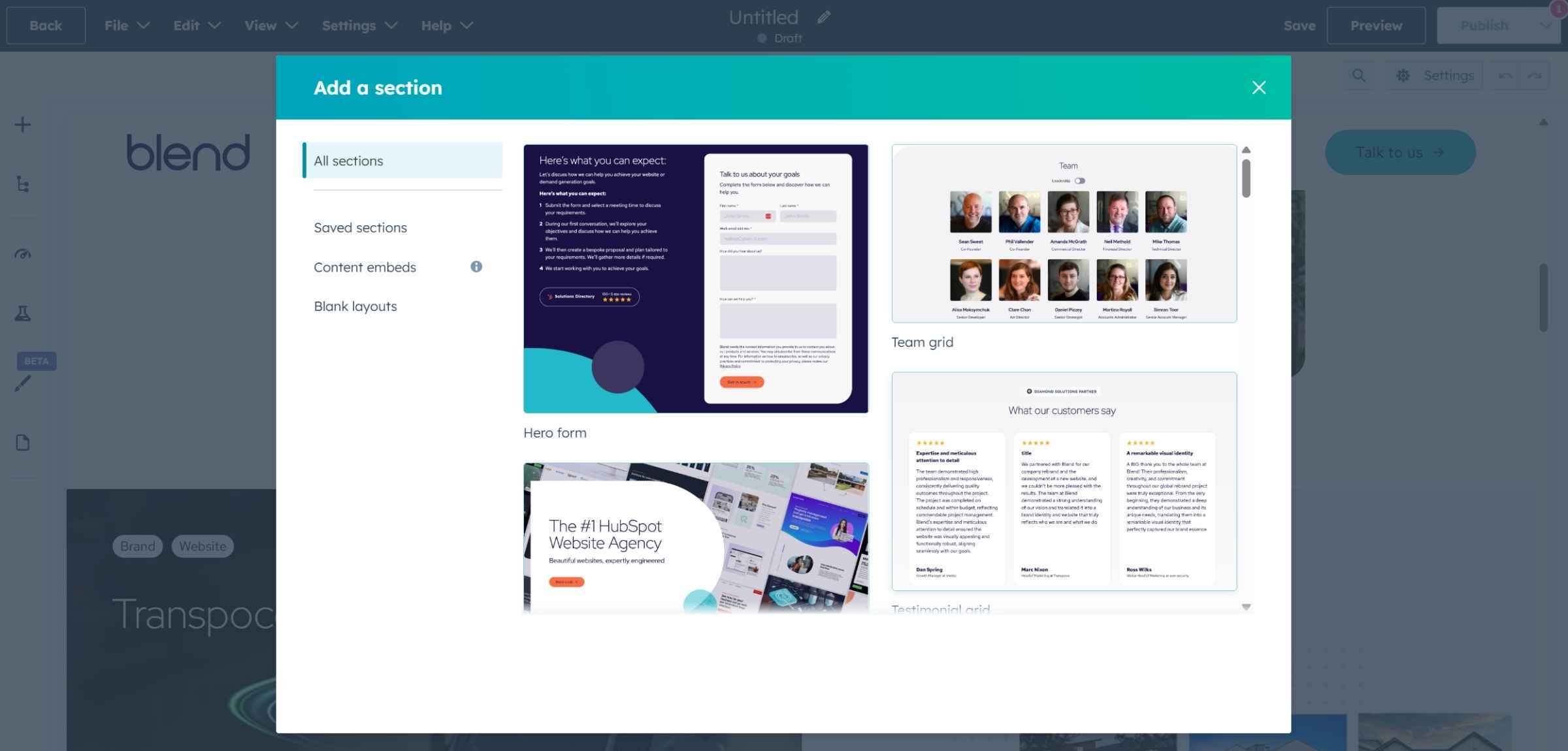
Once you've added a section to your page, you click into it to edit the content. Each section has specific fields you can modify, headings, body text, images, and buttons. The editing panel shows you exactly what you can change, removing any ambiguity about which elements are editable. If you need to reorganise your page, you can drag sections to reorder them, but the internal structure of each section stays intact, maintaining consistency throughout.
The key benefits of section-based editing include:
The alternative approach gives you individual modules, text boxes, images, buttons, and forms that you can position anywhere on the page. This approach is common in HubSpot's marketplace themes and offers complete creative freedom. Rather than working with pre-built sections, you're building layouts from scratch using individual components.
You start with a blank canvas and add modules from a panel. After adding a module, you drag it to position it anywhere on the page. You control the width, the spacing around it, how it behaves on different screen sizes, and all the styling details.
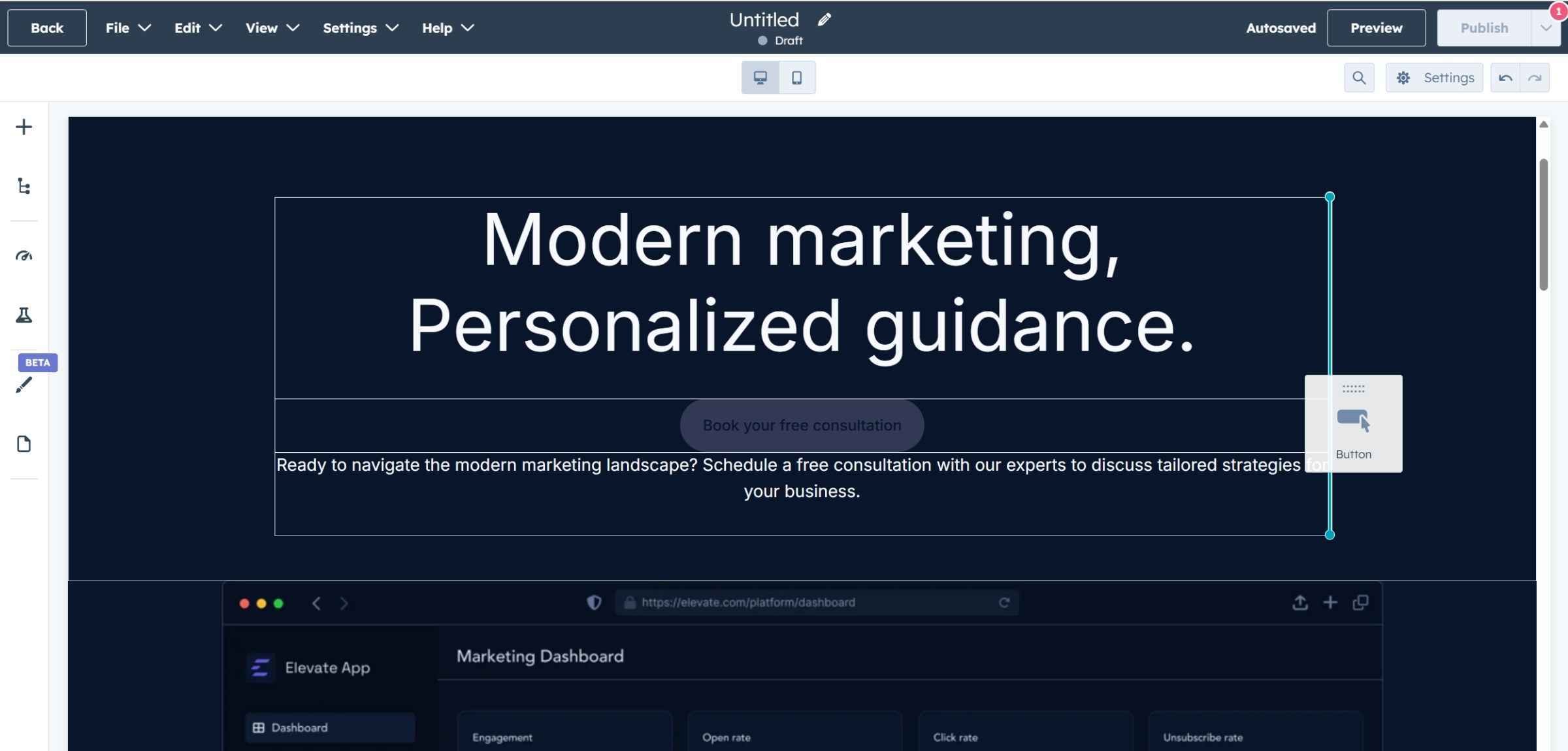
To create visual sections on your page, you manually add section dividers and configure background colours or spacing for each area. Every aspect of the layout is within your control, which provides flexibility but also requires more decision-making at every step of the page creation process.
The main advantages of flexible editing include:
The main challenges with flexible editing include:
Your choice between these approaches depends on several factors working together to define what will work best for your team.
Section-based editing typically suits businesses where multiple people contribute to the website, brand consistency is crucial, and speed of page creation matters. It's particularly effective for teams creating many similar page types and where team members focus on content rather than design.
Flexible editing often works better when a single person manages the website and has design knowledge in-house. It's suitable when creative freedom matters more than consistency, you need to experiment with unconventional layouts, or upfront budget is limited.
Think about your page creation volume as well. If you anticipate creating dozens of pages over the coming year, section-based editing saves substantial time. If you're creating only a handful of pages annually, the time savings might not justify the upfront investment in building a comprehensive section library.
HubSpot's website builder includes capabilities that extend well beyond basic page creation and editing, providing tools that help you optimise and manage your website more effectively.
Test different versions of pages without third-party tools. You can experiment with different headlines, layouts, or calls-to-action directly within the page editor, then let HubSpot track which version performs better. This integrated testing eliminates the need for external tools and makes experimentation accessible to marketers who might not have technical knowledge about setting up tests.
The page editor analyses your content in real-time and suggests improvements for meta descriptions, headings, and content structure. Rather than auditing pages after they're published, you can address SEO considerations in HubSpot during the creation process. This proactive approach ensures pages are optimised before they go live, saving time and improving search performance from day one.
See how pages will appear on desktop, tablet, and mobile devices before publishing. You can switch between views to ensure your content works across all screen sizes, catching responsive design issues before your audience encounters them. This preview is accurate to what visitors will actually see, removing uncertainty about how your changes will appear once live.
Every change made to each page is recorded, allowing you to revert to previous versions if needed. This creates a safety net for experimentation and protects against accidental changes. You can compare versions side-by-side and restore previous content with a single click, which gives your team confidence to make changes without fear of breaking something permanently.
Content staging allows you to test major redesigns or updates in a separate environment before pushing changes live to your production site. This is particularly valuable when making significant changes and wanting to ensure everything works correctly before your audience sees it. You can stage multiple pages, test them thoroughly, then publish them all at once for a coordinated launch.
If you're considering HubSpot for your website, start by evaluating your team's specific needs and constraints. Think honestly about who will be editing the website and their technical expertise. This directly influences whether you need the guardrails of section-based editing or whether flexible editing would serve you better.
Consider how important brand consistency is to your business and how frequently you'll create new pages. If you're launching campaigns regularly, the time savings from section-based editing compound significantly. Your budget and timeline matter too; if you need to launch quickly, flexible editing might make sense, whilst investing upfront in section-based editing pays dividends long-term.
The decision between approaches isn't permanent. Many businesses start with one method and evolve to another as their needs change. Choose what makes sense for your business today whilst keeping an eye on where you're heading.
HubSpot's website builder offers genuine advantages for B2B businesses that want to move faster with their marketing whilst maintaining quality and brand standards. The platform puts control in the hands of marketers without requiring technical expertise or creating dependency on developers for routine updates.
Whether you choose section-based editing for speed and consistency, or flexible editing for creative freedom, the platform provides the foundation for a website your marketing team can actually control. The key is configuring the editing experience to match your team's needs, working style, and capabilities, then empowering them to make the most of it.
With the right setup and approach, your website becomes an asset that enables your marketing rather than a constraint that holds you back.
Speak with our team to discuss how we can create a website that gives your marketing team the control they need.


.jpg)