

HubSpot has just released its AEO product, and if you're one of the many B2B marketers who's been reading about AEO, creating content for AEO, and hoping for the best without any way to measure it, this changes things.
In this blog, we'll walk you through exactly what the HubSpot AEO tool does, how to set it up, and how to use it as part of a structured strategy. We'll also cover why AEO matters, why a dedicated tool is non-negotiable, and answer the questions we hear most often about both the tool and AEO in general.
If you'd prefer to watch a video overview, we do a full tour and breakdown of the product here:
Sections in this blog:
- Why AEO matters right now
- Why you need a dedicated AEO tool
- What is HubSpot AEO?
- How to set up HubSpot's AEO product
- Setting up and managing your prompts
- Analysing prompt performance
- Understanding citations in HubSpot AEO
- The dashboard overview
- HubSpot AEO recommendations section
- Frequently asked questions
- What to do next
Why AEO matters right now
The way buyers research solutions has fundamentally changed. Where they once waded through ten blue links on Google, they're now going straight to AI. They're asking ChatGPT, Claude, Gemini, and Perplexity to synthesise answers for them and getting bespoke shortlists back in seconds.
The data makes this hard to ignore.
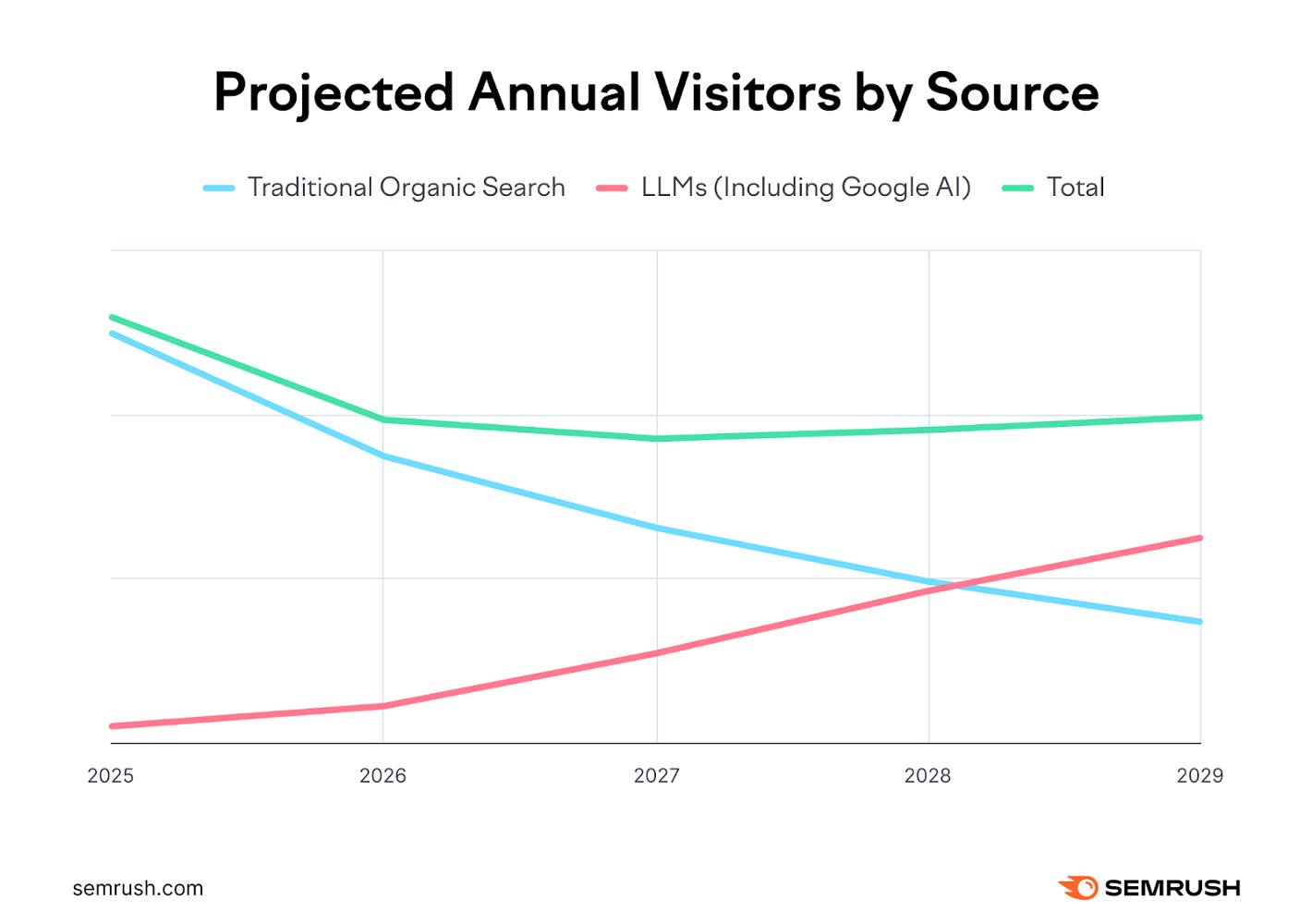
A Semrush projection shows that LLM-referred traffic is on track to overtake traditional organic search by around 2028. And that timeline only accelerates as Google continues to make AI the default search experience.
Research from SimilarWeb shows that the average Google query is just 3.4 words long. Google AI Mode queries average 10.4 words. ChatGPT prompts? Around 60 words on average. Buyers aren't searching keywords anymore. They're giving AI their full context, their industry, their tech stack, their specific challenges and getting curated recommendations in return.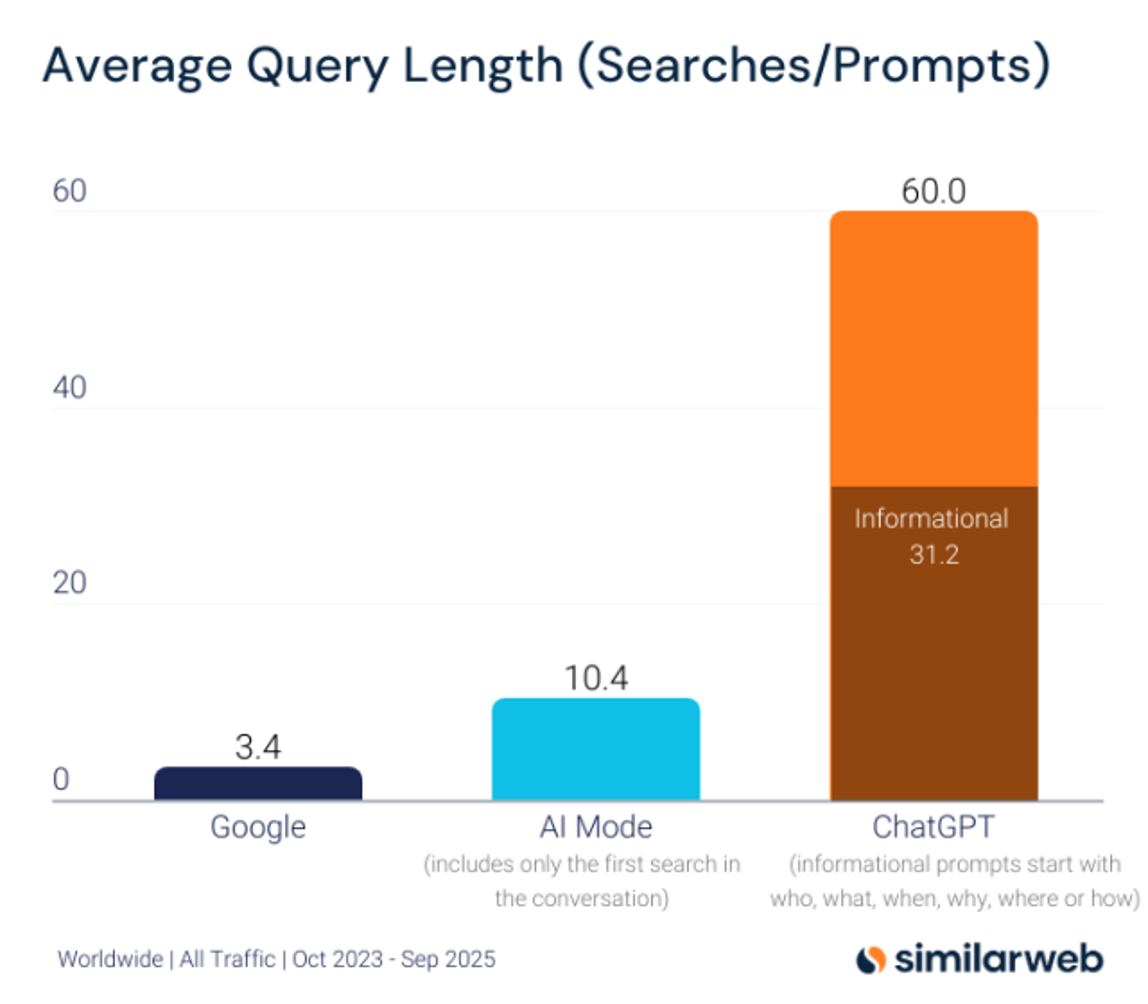
If your brand is being mentioned in those AI answers, you're on the shortlist. If you're not, you're invisible, and the buyer has moved on before you even knew they were looking.
Why you need a dedicated AEO tool
Here's the uncomfortable truth: you can run an AEO strategy hoping for the best. You can publish content, update your website, and cross your fingers. But without a tool to actually measure what's happening in large language models, you have no idea whether any of it is working.
It would be like running an SEO strategy without Semrush, Ahrefs, or an equivalent. You'd have no visibility on rankings, no data on what's moving, and no way to course-correct.
AEO is no different.
The challenge is that AI platforms give you almost nothing natively. ChatGPT isn't sending you a weekly report on which brands it recommended to your buyers. You can't log into Perplexity and check your citation rate. Without a dedicated monitoring tool, the entire channel is a black box.
A good AEO tool lets you track specific prompts across multiple AI platforms, see whether your brand is being mentioned or cited, understand how you compare to competitors, and use that data to inform what you create next. That's not a nice-to-have — it's the only way to run a strategy that actually improves over time.
What is HubSpot AEO?
HubSpot AEO is a new tool built directly into Marketing Hub that allows you to monitor, track, and improve your brand's visibility across AI search platforms. It sits inside your existing HubSpot portal, no separate login, no disconnected dashboard. It gives you a consolidated view of how your brand is performing in AI-generated answers.
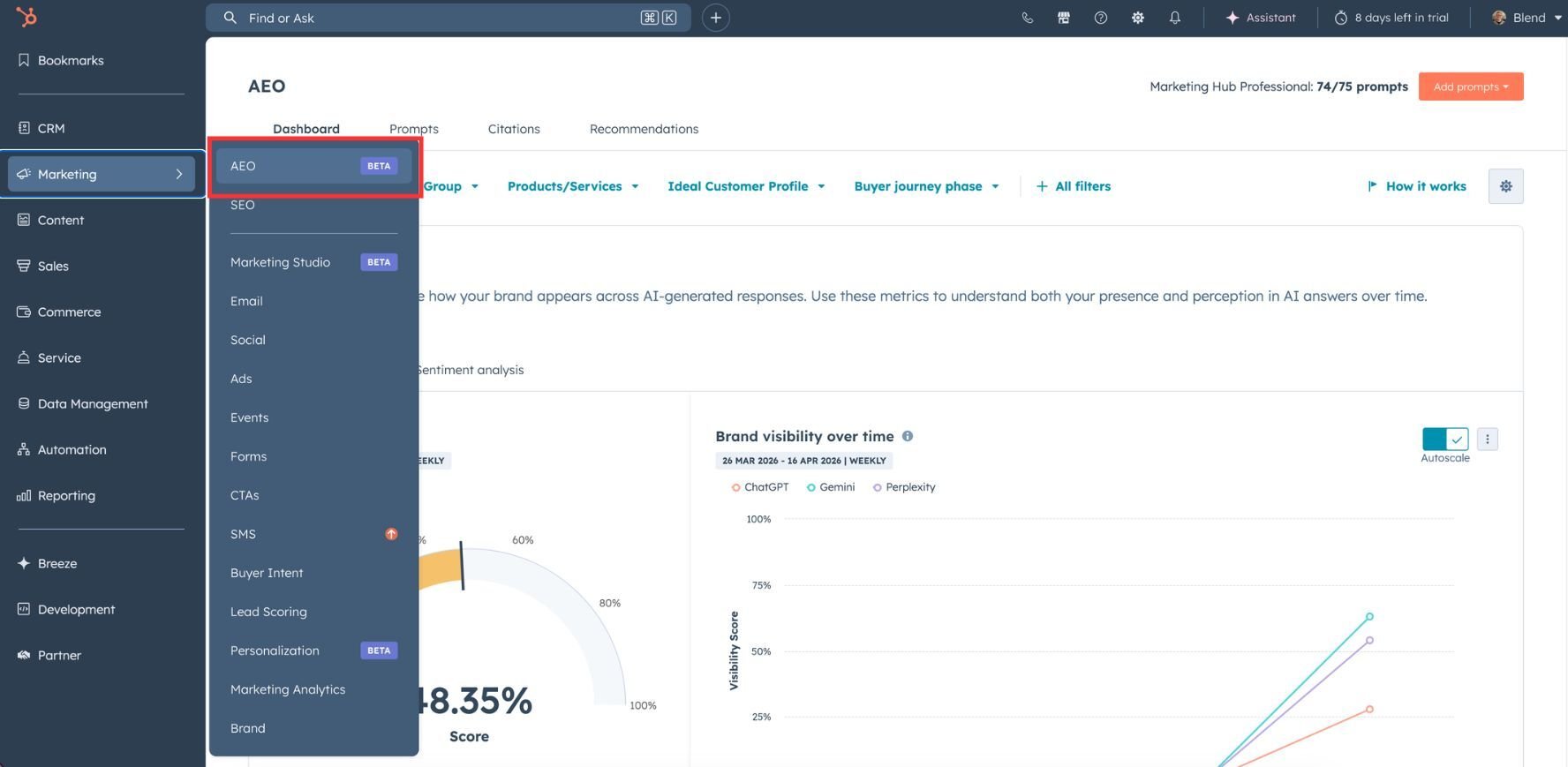
The tool covers ChatGPT, Gemini, and Perplexity, tracking your brand mentions, website citations, and competitive positioning across all three from one place. It also surfaces recommendations for the kind of content you should be creating to improve your visibility over time.
The tool came off the back of HubSpot's acquisition of Xfunnel, which was already an impressive standalone AEO platform. Having that capability natively inside HubSpot, connected to your CRM data, your ICP information, and your existing content, takes it to a different level.
How to set up HubSpot's AEO product
To get to the tool, head into your HubSpot portal and go to Marketing > AEO.
You'll be taken through a setup wizard the first time, which covers the following.
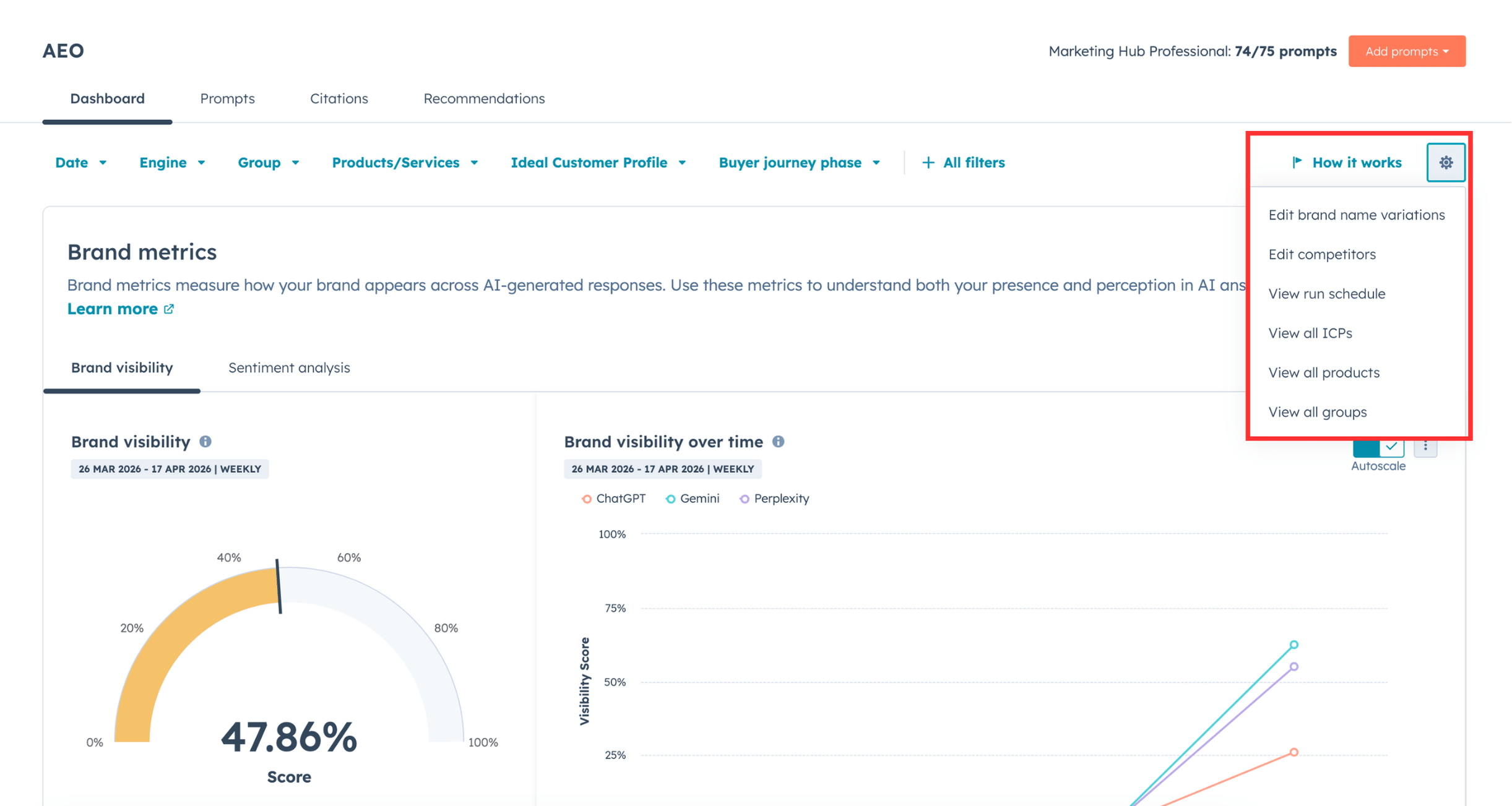
Brand name variations
This is where you tell HubSpot what to look for. Add your primary brand name and any variations that might appear in AI responses, different product names, abbreviated versions, or common alternatives. The more complete this list, the more accurately the tool will identify where you're being mentioned.
Competitors
Add the competitors you want to track against. You'll need their domain and any name variations they use. This sets up the competitive benchmarking that runs throughout the tool.
ICP setup
HubSpot will pull ICP information from your existing brand identity data and CRM where it can, but you can also create or refine these manually. For each ICP you can specify location, a description, business types, job titles, company sizes, and revenue ranges. The more specific your ICP setup, the more realistic your prompt tracking will be.
You can also create multiple ICPs if you're targeting different segments, which is worth doing if your buyers look meaningfully different from one market to another.
Products and services
Again, HubSpot will try to pull this from your existing data, but you can refine it here. This helps the tool assign context to your prompts and produce more accurate tracking results.
Prompt groups
Groups let you tag and segment your prompts by product area, industry, or whatever categorisation makes sense for your business. This is particularly useful once you've got a large prompt list, it means you can filter the dashboard by specific areas and understand how you're performing topic by topic, rather than just in aggregate.
Setting up and managing your prompts
Your prompt list is the foundation of everything in HubSpot AEO. Once you've got your setup complete, adding the right prompts is the most important thing you can do.
You can add prompts manually one by one, or bulk upload them, which is the more practical approach once you've generated a proper list. For each prompt, you can assign an ICP, a product or service, and a buyer journey phase, which helps the tool run that prompt with the most appropriate context.
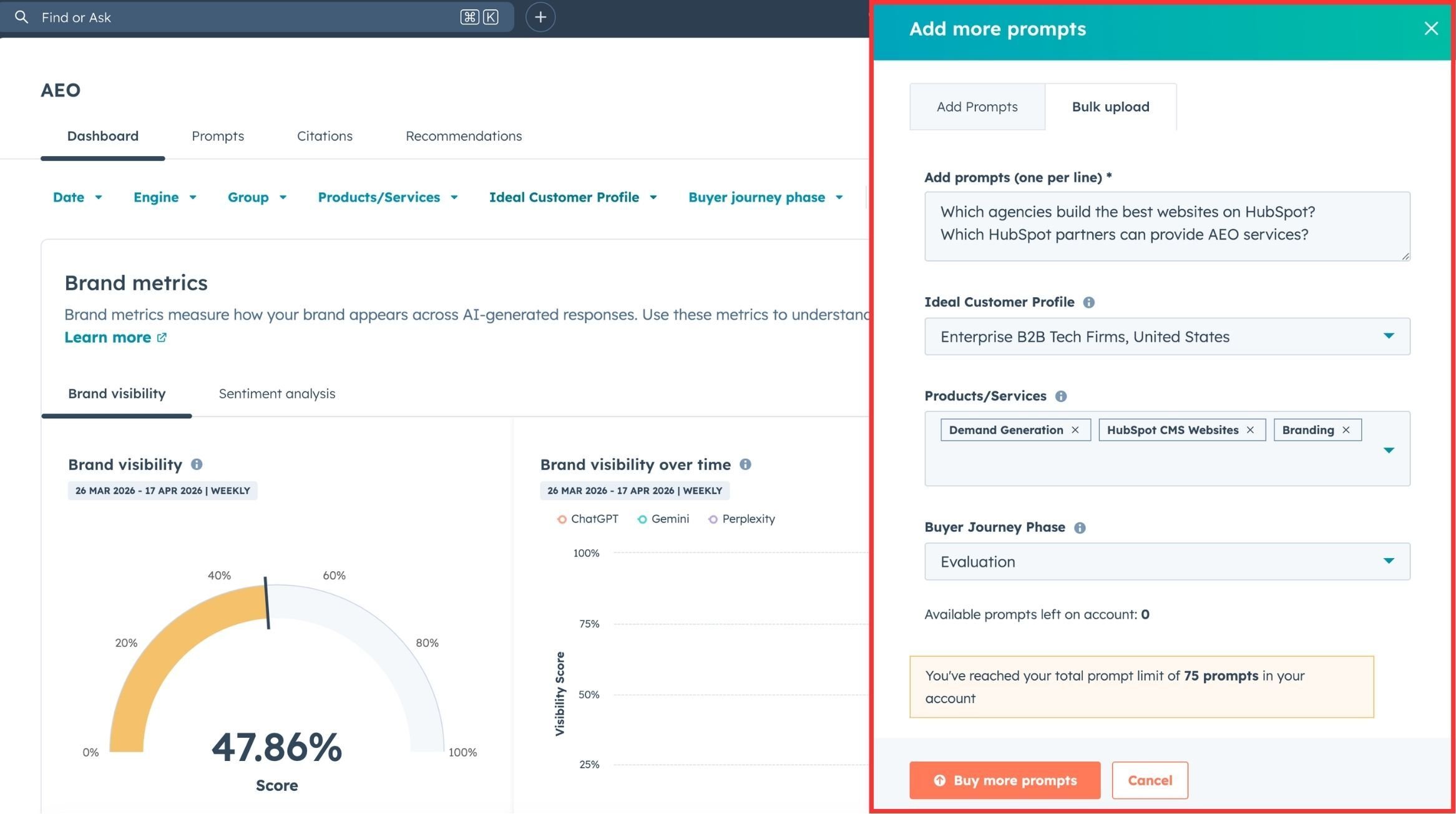
One thing worth being clear on: it's genuinely impossible to know the exact prompts your buyers are using. The average real-world prompt is 30 to 40 words long, packed with personal context, memory from previous AI conversations, and specific constraints you'd never be able to replicate exactly. That's fine. You're not trying to match prompts one-to-one, you're tracking directional trends.
What you're looking for is whether your visibility is improving across a range of prompts that represent how your buyers think and search. That's what matters. Aim to build a substantial list, we typically generate around 200 or more per project, split across topic areas, industries, and market segments.
Analysing prompt performance
Once your prompts are running, you can click into any individual prompt and see a granular breakdown of how you're performing for that specific query. This is where the analysis gets very useful to drive your content strategy.
.png?width=2460&height=1303&name=HubSpot%20AEO%20Tool%20(1).png)
For each prompt you can see:
- Your visibility rate versus competitors across ChatGPT, Gemini, and Perplexity
- Your share of voice in each AI engine
- Whether your website is being cited, and what type of citation it is (owned, earned, or peer)
- The top URLs being cited for that prompt across all sources
- Citation breakdown by content type, blogs, product pages, directories, guides, and so on
- The actual AI-generated answers from each platform, so you can read exactly what's being said
That last point is particularly valuable. Being able to read the full AI response, not just a metric, means you can see how competitors are being described, what content is being cited, and how the answer is framed. That context shapes your content strategy in ways that a number on a dashboard simply can't.
HubSpot also surfaces recommendations here, pulling out suggested actions based on what it's seeing across your tracked prompts. Some of these are genuinely useful as a starting point, particularly if you're new to AEO and not sure where to begin.
Understanding citations in HubSpot AEO
Citations are different from mentions and the distinction matters.
A mention is when an AI response names or references your brand. A citation is when an AI platform actually uses your website as source material, pulling content from your pages as evidence or reference for the answer it's giving.
Within HubSpot AEO, the citations section shows you your own domain citation rate versus competitors, your broader citation presence across all sources (not just your own site), and a breakdown by content type and channel.
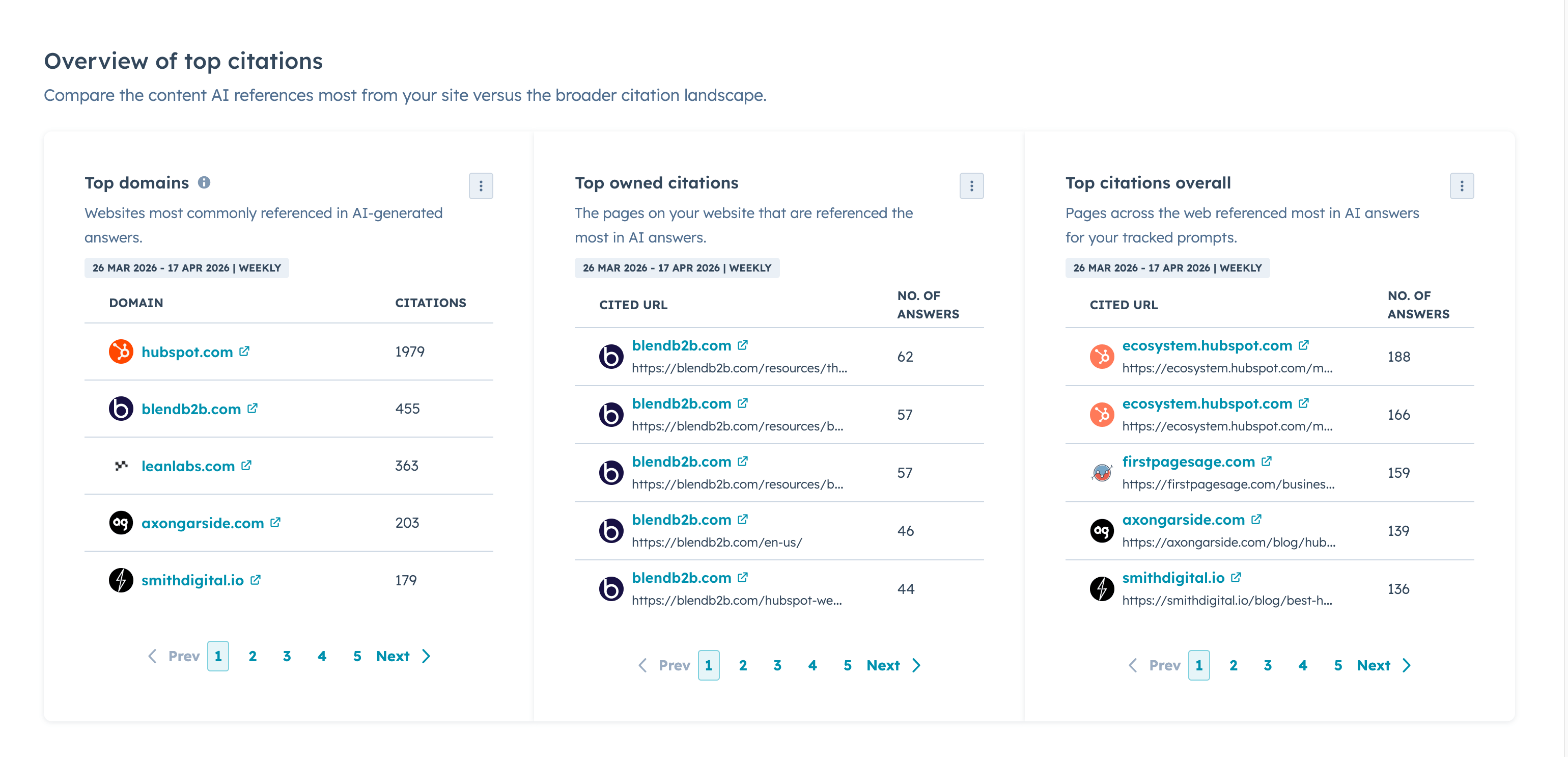
For most businesses, the most actionable place to start is owned citations. You control the content, you control the narrative, and if your page is being cited in a response aligned with your ICP, there's a good chance the AI is conveying your brand, your positioning, and your offer accurately to the buyer. That's powerful.
When we looked at our own HubSpot-related prompts inside the tool, our domain came in second only to HubSpot itself in terms of citations, which tells us our AEO content strategy is having a tangible impact. One blog alone was being cited in 22 separate AI answers.
Third-party citations matter too, particularly if you're investing in digital PR or trying to build presence in high-value industry publications. The citations section gives you the data to evaluate how that's working alongside your owned content efforts.
The dashboard overview
The dashboard aggregates everything you've seen at the prompt and citation level into a single overview. Think of it as the 30,000-foot view after you've done the detailed work.
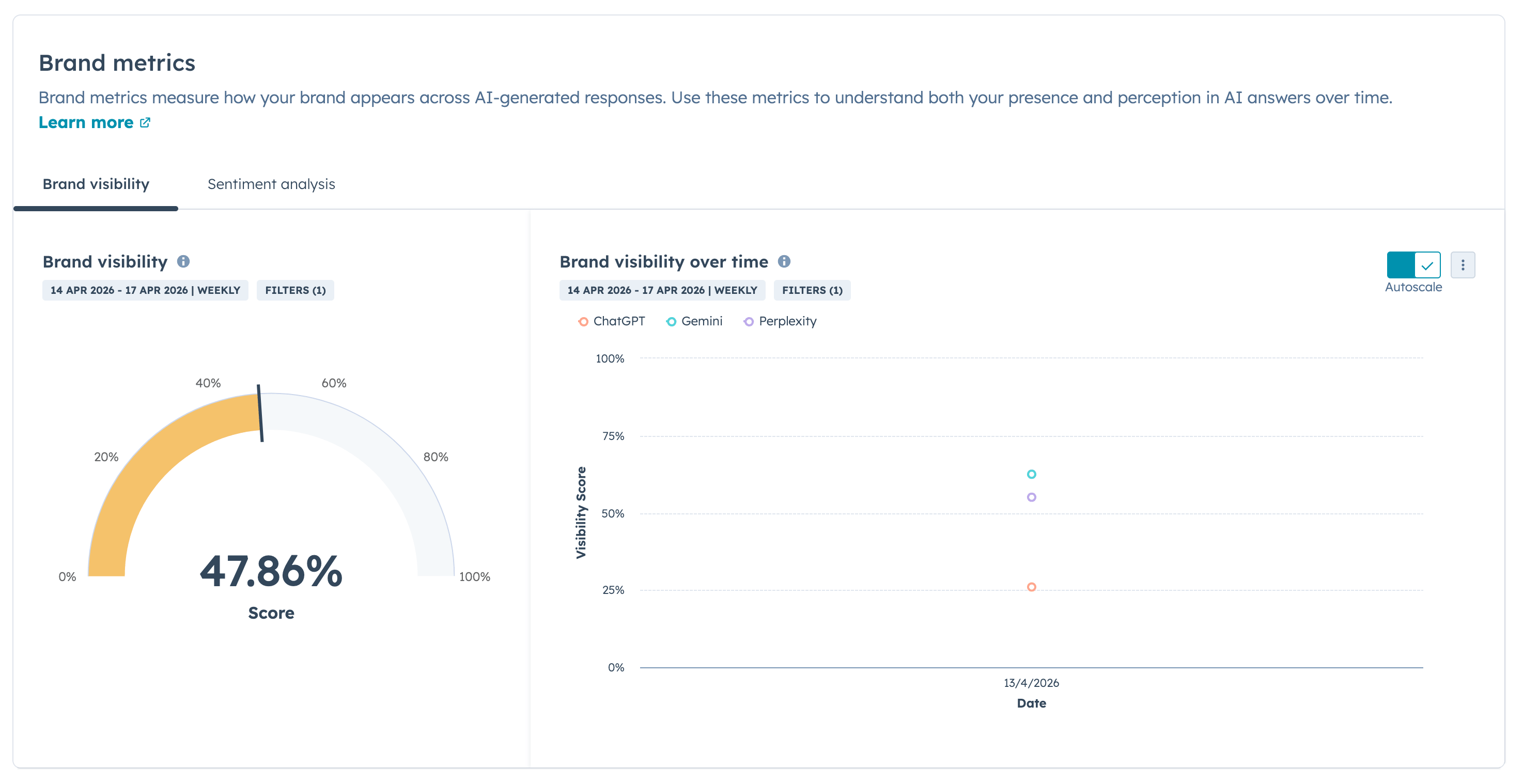
At the top, you'll see your overall brand visibility score, how often your brand is being mentioned across all the prompts you're tracking. For us, that's sitting at 50% across our tracked prompt set. Below that, you get a trend graph showing how that visibility is moving over time. If your AEO strategy is working, that line should be going up.
You'll also see a competitive share of voice breakdown, how many mentions you're getting compared to the competitors you've added, and an aggregated view of citation data across all prompts.
If you've set up prompt groups, you can filter the entire dashboard by group, so you can isolate performance by product area, industry, or buyer segment. You can also filter by AI platform — helpful if you're seeing significantly different results across ChatGPT, Gemini, and Perplexity and want to understand why.
HubSpot AEO recommendations section
The recommendations section is HubSpot putting its analysis to work. Based on everything it's seeing across your tracked prompts, the answers being generated, the content being cited, the gaps in your visibility, it surfaces suggested actions for improving your AEO performance.
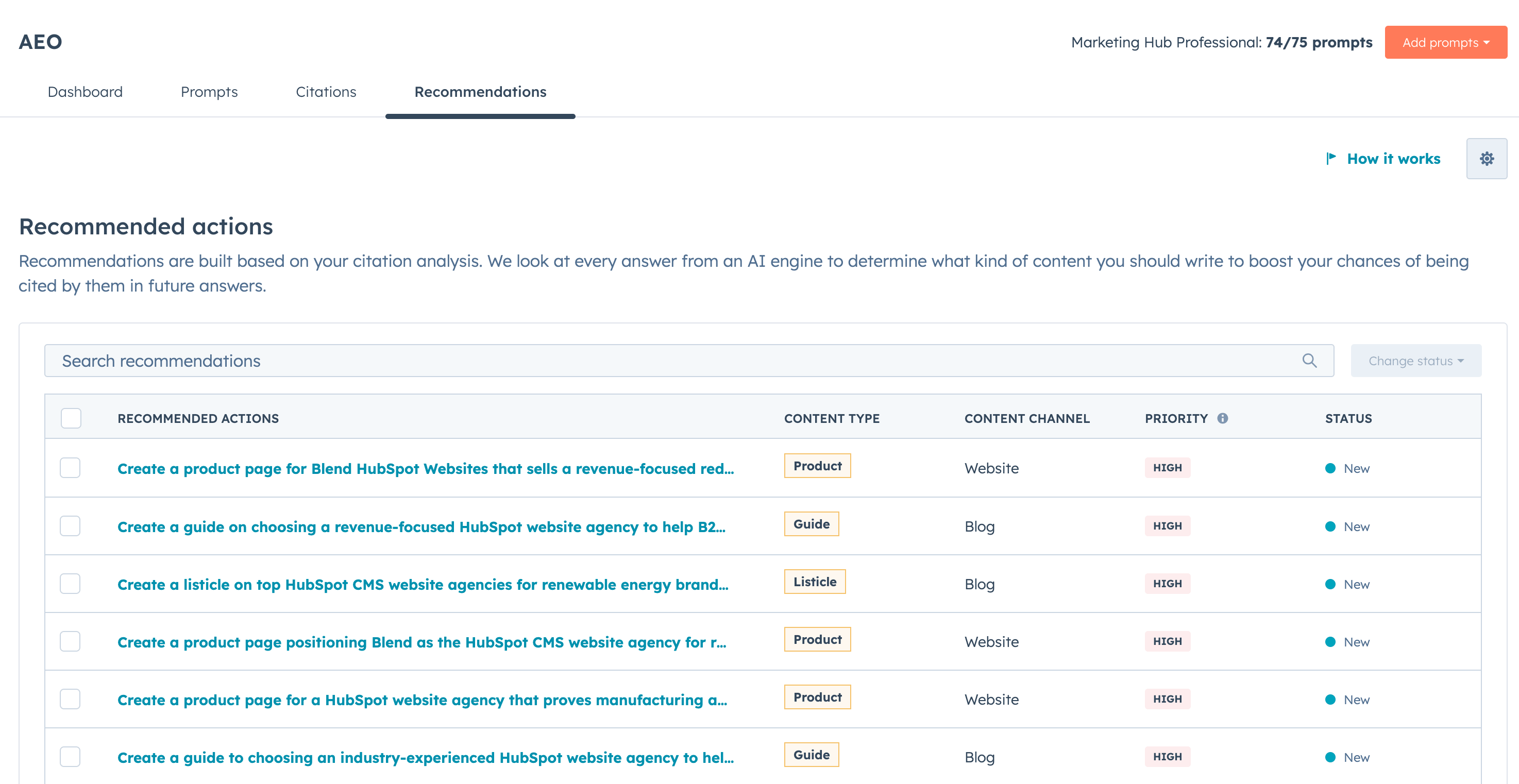
These might be new pages to create, existing content to update, or third-party platforms worth targeting for a mention. The quality varies, and we'd always recommend grounding your content strategy in your own citation analysis rather than following recommendations wholesale. But as a directional starting point, particularly when you're just getting set up, it's a useful layer on top of the raw data.
Frequently asked questions
What is Answer Engine Optimisation (AEO)?
Answer Engine Optimisation (AEO) is the practice of optimising your brand, content, and online presence to appear in AI-generated answers. Where traditional SEO focuses on ranking in Google's search results, AEO is about being mentioned, cited, and recommended by large language models like ChatGPT, Gemini, Perplexity, and Google AI Mode when buyers ask questions relevant to your product or service.
How is AEO different from SEO?
SEO and AEO share some common ground, quality content, strong brand signals, and credibility all matter in both, but they're governed by very different factors. Research from Ahrefs analysing 75,000 brands found that the factors most strongly correlated with AI visibility are off-site signals like web mentions, branded anchors, and branded search volume, rather than traditional SEO metrics like backlinks and Domain Rating. The content that wins in AI search also looks different: buyers are using long, contextual prompts and getting back nuanced, curated answers. Broad, keyword-led pillar pages are much less effective here than highly specific content that directly addresses a real buyer scenario.
Which AI platforms should I be optimising for?
The priority platforms right now are ChatGPT, Google AI Mode, Gemini, and Perplexity. ChatGPT has the largest user base and is notably fast at picking up new, well-structured content, we've seen brands get cited there within three days of publishing. Google AI Mode and AI Overviews take longer due to Google's index dependency, typically three to eight weeks. Perplexity is worth tracking too, particularly in technical and research-heavy categories.
How long does it take to see results from AEO?
Faster than traditional SEO, which is one of the things that makes it exciting. Based on our own experience and client work, well-optimised content can start appearing in ChatGPT citations within three days of publishing. Google's AI models are slower, AI Overviews typically take three to four weeks, and Google AI Mode closer to six to eight weeks. That said, building meaningful, measurable presence across your full prompt set is a longer game. We saw our own citation rate increase 71% and overall visibility double from 18% to 36% over the first several months of running a structured AEO strategy.
Do I need to create new content for AEO or can I optimise what I already have?
Both. A good starting point is a citation audit, using an AEO tool to see what content types are actually being cited in your category. Some businesses find that existing content, with some structural improvements, can start performing in AI search fairly quickly. But because AEO rewards hyper-specific content that addresses nuanced, long-form queries, most businesses will need to create new content too. The key insight is that one broad piece of content can't cover 200 different prompt variations. Volume and specificity both matter.
Which HubSpot subscription do I need to access the AEO tool?
HubSpot AEO is a Marketing Hub Pro and Enterprise feature. If you're on a lower tier of Marketing Hub, or you don't have Marketing Hub as part of your subscription, you'll need to upgrade to access it. The tool is currently in public beta.
How does HubSpot track AI visibility?
HubSpot AEO works by sending your tracked prompts to the APIs of major AI platforms, ChatGPT, Gemini, and Perplexity, and pulling back the actual responses. It then analyses those responses to identify whether your brand is mentioned, whether your website is cited as a source, and how competitors are performing for the same prompts. This runs on a 24-hour schedule, so your data refreshes daily.
Can I track competitors in HubSpot AEO?
Yes. During setup, you add competitors by domain and name variations. Once added, they're tracked across all your prompts alongside your own brand, so you get a direct comparison of share of voice, citation rate, and overall visibility. It's one of the more useful features, particularly for identifying which competitors are getting cited most often and what content they're being cited for.
How many prompts should I be tracking?
There's no hard rule, but more is generally better, up to a point. We typically recommend around 200 or more prompts per project, segmented by topic area, industry vertical, and buyer persona. The goal isn't to find one perfect prompt. It's to track a broad enough set that you can identify meaningful trends in your visibility over time. A handful of prompts won't give you statistically reliable data. A well-structured list across your core topic areas will.
What's the difference between a mention and a citation in HubSpot AEO?
A mention is when an AI response names or refers to your brand. A citation is when an AI platform actually uses your website as source material, referencing a specific page as the basis for information in its answer.
Citations are generally more valuable because they mean your content is actively being used to inform AI responses, and they typically correlate more strongly with brand visibility and buyer trust. HubSpot AEO tracks both, and breaks citations down further into owned (your own domain), earned (third-party coverage), and peer (directories and partner listings).
Start measuring what actually matters in AI search
AEO without measurement is just content creation with ambition attached. The HubSpot AEO tool changes that, giving you real data on where your brand stands in AI search, how you compare to competitors, and what you need to do next.
If you're already a Marketing Hub Pro or Enterprise customer, the tool is there waiting for you. Get your prompts loaded, start tracking, and give yourself something concrete to optimise against.
And if you want to build a full AEO strategy around the data you'll collect, one grounded in ICP documentation, prompt simulation, citation analysis, and a content engine that scales, find out more about our AEO services.